AT&T Usage Widgets
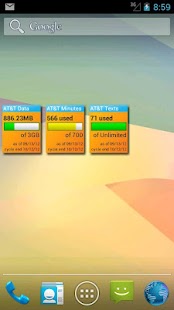
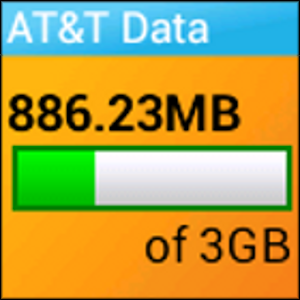
Use these handy widgets to know your currently used minutes, data and texts at a glance.
You can also set the usage information to display in your notification drop-down area!
The stats will automatically update so you always know where youre at.
Works with all plan types including family share plans!
This works by automatically logging into AT&Ts servers to pull down the latest statistics on your account.
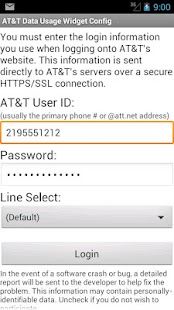
Very easy to use, just add the widget to your screen, enter your AT&T login information and it does the rest.
Installing this will put you back in control of your account.
PLEASE NOTE: If you are having troubles connecting, please ensure first that you can connect using the My AT&T app.
If you cant login there, you wont be able to use this.
Contact AT&T if necessary to have them reset your password.
You may also have to try signing in with your email address instead of your phone number.
At this time, AT&T Usage Widgets is not compatible with Prepaid or Business accounts.
Usage data is refreshed automatically about every other hour.
WIDGET INSTALL INSTRUCTIONS---------------------------NOTE: Some users have reported that they needed to reboot their phone before the widgets shows up in the app list.
NOTE: Do not install on SD, use local memory only.
Widgets on Android are not compatible with SD storage.
Android 2-3: On your home screen, do a long press and tap Widgets.
Scroll down and tap on "AT&T Data Usage Widget".
Android 4 ICS: Go to your apps list, scroll all the way to the right under Widgets, hold down on "AT&T Data Usage Widget" and drag it to the location on your home screen.
TIP: To select a different line, you must first log in - then go back into the configuration screen and choose from the list.
This software is not affiliated with, licensed or endorsed by AT&T or any related companies.
All trademarks or registered trademarks are the property of their respective owners.
About AT&T Usage Widgets
- Package name (App ID)
- com.hoeksoft.attusagewidgets
- Available on
- Google Play
- Price
- Free
- Version
- v3.1
Looking for the AT&T Usage Widgets APK?
The safest way to get AT&T Usage Widgets (com.hoeksoft.attusagewidgets) on your Android device is to install it directly from Google Play — you'll always get the latest official version, automatic updates, and no risk of modified or infected APK files from third-party sites.
Social Features
Connect and share with friends and the community.
Gaming Features
Enjoy immersive gaming experience with various game modes.
News & Updates
Stay informed with the latest news and updates.
See AT&T Usage Widgets in Action

Frequently Asked Questions
Is AT&T Usage Widgets free?
Yes, AT&T Usage Widgets is free to download and install on Android through Google Play.
How do I install AT&T Usage Widgets on Android?
Open Google Play on your Android phone or tablet, search for AT&T Usage Widgets or tap the Google Play button on this page, then tap Install. The app downloads and installs automatically.
What is com.hoeksoft.attusagewidgets?
com.hoeksoft.attusagewidgets is the App ID (package name) of AT&T Usage Widgets on Google Play. Every Android app has a unique package name, and it is the safest way to verify you are installing the official app.
Is AT&T Usage Widgets safe to download?
Installing AT&T Usage Widgets from Google Play is the safest option: you get the official version, verified by Google Play Protect, with automatic updates. Avoid APK files from unofficial third-party sites.
Get AT&T Usage Widgets Today
AT&T Usage Widgets for Android — free download on Google Play.
Compatible with Android phones and tablets — available on Google Play.
Ask AI about this app
Get instant answers about features, tips and more from popular AI assistants.